
Electronics
The electronics course introduces students to basic electronics with the goal of designing circuits to control model industrial machinery.
The course begins with a number of circuits that the students will build at home even before our first class meeting. Some of the topics covered are: relays, potentiometers, photo resistors, diodes, LEDs, transistors, Ohms law, op amps, voltage regulators, comparators, timers, transistor logic, digital logic, flip-flops, counters and many more...
The course will be five weekly four hour sessions. Each session will be two hours of class time and two hours build time while I oversee and grade papers. Our class time will be used to give students experience in modifying previously built circuits to fit particular applications and control models. One of our first models will be a simple car wash similar to this complex version.
Solving mathematic equations is necessary for this course, so students must have completed Algebra 1/2 to enroll. The cost will be $250 and will be limited to six students. Class will meet on the first monday of each month from 12-4 PM.
The course begins with a number of circuits that the students will build at home even before our first class meeting. The initial exercises use two sets that are purchased on amazon - the REXQualis Electronics Component Fun Kit and CMOS Logic 4000 4500 IC Series. Later the course will use the ELEGOO UNO R3 Project Most Complete Starter Kit for the study of microcontrollers. Most of the learning will come through hands on experience and youtube videos, however if you like to have all the information in one place, please purchase Practical Electronics for Inventors, Fourth Edition
Here is a list of the ICs we will use with links to click on for more info. Admitedly, my real goal is to get you hooked on the amazing hobby that is electronics and building. There is no end to where this world will lead, you might even completely loose interest in social media!!! There are lots of tools and supplies that will be helpful along the way- here are some of my suggestions. 4001 Four 2-input NOR gate
4010 Hexadecimal converter
4011 (video) Four 2-input NAND gate
4013 (video) Two-way Class D flip-flop
4015 Double shift register
4017 (video) Decimal counter Direct plug
4021(4014) Shift register
4024 Binary counter
4025 Triple 3-In NOR Gate
4026 (video) Decimal counting/divider
4027 Trigger
4028 BCD Decimal Decoder
4040 Binary serial counter/divider
4046 Clock/Timing/Clock Generator
4051 Eight choose one analog switch
4052 Multiplexer / Demultiplexer
4053 Analog switch
4060 14-level binary serial counting
4073 Three 3-input AND gate
4081 Four 2 input terminals and gate
4093 Four 2-input Schmitt trigger
40106 Six Schmitt trigger
4511 Quad 2-In NAND Schmitt Triggers
4516 Digital logic circuit
555 (video) Timer
Here is a list of the ICs we will use with links to click on for more info. Admitedly, my real goal is to get you hooked on the amazing hobby that is electronics and building. There is no end to where this world will lead, you might even completely loose interest in social media!!! There are lots of tools and supplies that will be helpful along the way- here are some of my suggestions. 4001 Four 2-input NOR gate
4010 Hexadecimal converter
4011 (video) Four 2-input NAND gate
4013 (video) Two-way Class D flip-flop
4015 Double shift register
4017 (video) Decimal counter Direct plug
4021(4014) Shift register
4024 Binary counter
4025 Triple 3-In NOR Gate
4026 (video) Decimal counting/divider
4027 Trigger
4028 BCD Decimal Decoder
4040 Binary serial counter/divider
4046 Clock/Timing/Clock Generator
4051 Eight choose one analog switch
4052 Multiplexer / Demultiplexer
4053 Analog switch
4060 14-level binary serial counting
4073 Three 3-input AND gate
4081 Four 2 input terminals and gate
4093 Four 2-input Schmitt trigger
40106 Six Schmitt trigger
4511 Quad 2-In NAND Schmitt Triggers
4516 Digital logic circuit
555 (video) Timer
Initial circuits to learn
Before coming to class there are a number of circuits to build on your own that will help prepare you for our class times together. You will find many of your exercises use electrical schematics to show you how things are put together. First, you need to understand how your breadboard works. If you do a search for “basic breadboarding exercises” you find there are quite a few. You might do some of the simpler ones that look interesting to you. This is a good starter video. Before going to far, you will want to understand how to use and protect your LED lights. Please learn how to read resister codes, (print this resister code chart), understand capacitors. and use Omh's law. If you would rather learn from a book than from videos- this is the old text from the learning lab we used to use and it is a very good resources that has most all you need to know. It is a lot of pages, but it would be good to print out so you can have all the info in one place.
Circuits we will use for our machines-
You will need to get from me these parts to complete the following circuits- 555 chip, relay, LED strip
Once you feel comfortable with your breadboard, please go on and learn about the 4000 series CMOS chips. This webpage has general information on most of the chips in your collection from amazon. The RCA databook has information on every chip, but it is very detailed. You can also find out a lot about a chip by putting its number into a google search for its functional layout. Please use the following videos to learn how to use of some of the most common chips. 4013 Flip-flops will often be used to turn a circuit on or off. 555 chips can be used for flashing lights or creating delays. They are a little tricky to get to work, so follow the instructions closely. Once you getting it working you can modify it to change the time rate. 4011 Nand gates control various decisions and variables. Relays control motors with your circuits. The 4000 series circuits cannot control motors because they can only handle a very small amount of current. 4017 decade counters create sequences of actions and keep counts. 4026 decimal counters display numbers on a read out. You can also create a compact version if you have a 5916 chip. You can also find more information on the 4000 series chips in the youtube series by David Watts
If you would like to make your own schematics, Circuit Canvas is a nice online tool. To understand the logic behind cmos logic gates, called boolean logic, this PBS presention is good. Before watching it, it would be good to print out the chart at the top of this page.
Being that you have learned how to use ICs, you should take some time to learn how they are made. This video shows you the factories that make them. This video explains the basic transistors well. Learning how to count in binary is also helpful.
Our class will be a lot of learning by doing, however, a full academic course on Electronics is available through The Great Courses.
After choir on Fridays, I am happy to give you help with circuits you may have trouble with.
Before coming to class there are a number of circuits to build on your own that will help prepare you for our class times together. You will find many of your exercises use electrical schematics to show you how things are put together. First, you need to understand how your breadboard works. If you do a search for “basic breadboarding exercises” you find there are quite a few. You might do some of the simpler ones that look interesting to you. This is a good starter video. Before going to far, you will want to understand how to use and protect your LED lights. Please learn how to read resister codes, (print this resister code chart), understand capacitors. and use Omh's law. If you would rather learn from a book than from videos- this is the old text from the learning lab we used to use and it is a very good resources that has most all you need to know. It is a lot of pages, but it would be good to print out so you can have all the info in one place.
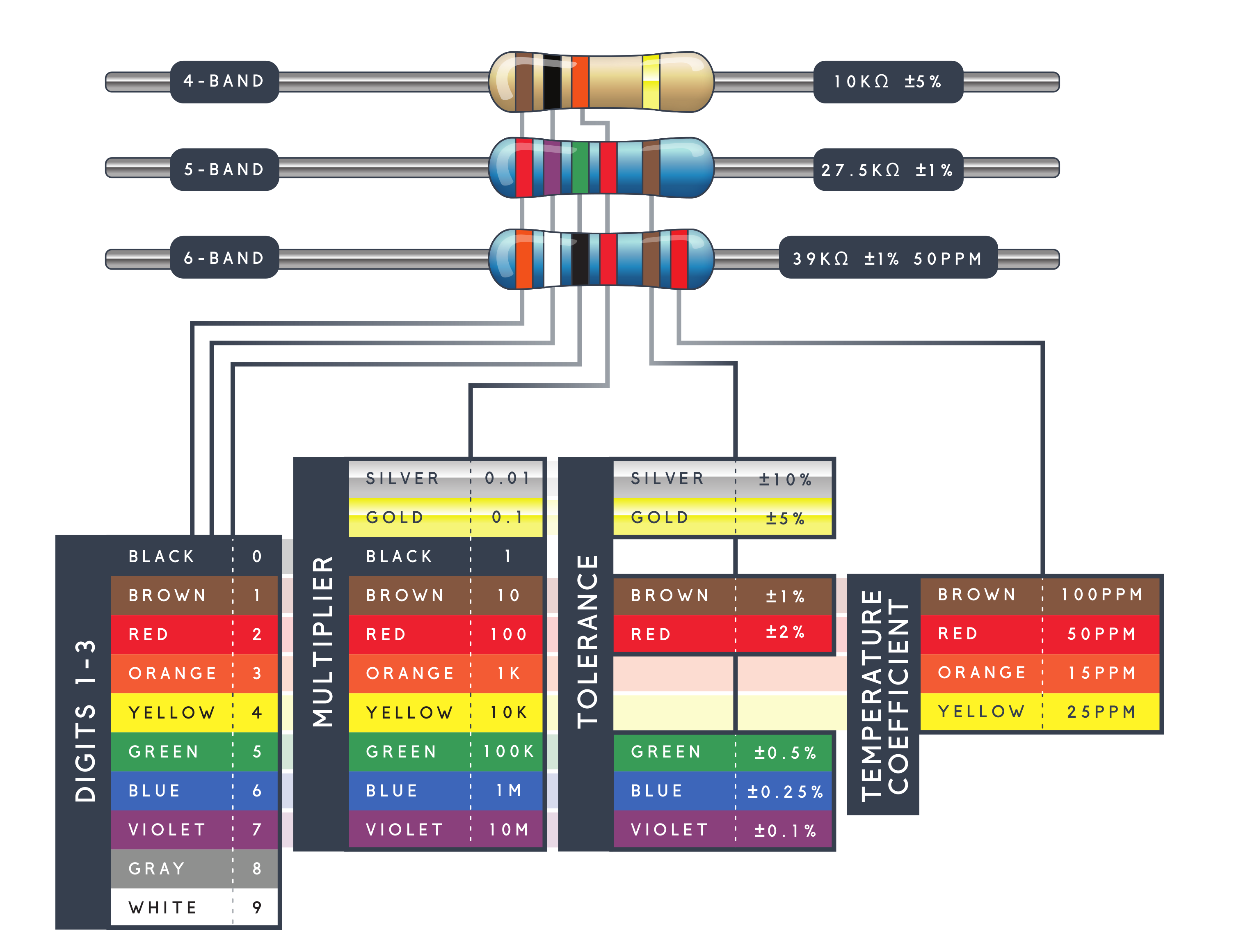
Circuits we will use for our machines-
You will need to get from me these parts to complete the following circuits- 555 chip, relay, LED strip
Once you feel comfortable with your breadboard, please go on and learn about the 4000 series CMOS chips. This webpage has general information on most of the chips in your collection from amazon. The RCA databook has information on every chip, but it is very detailed. You can also find out a lot about a chip by putting its number into a google search for its functional layout. Please use the following videos to learn how to use of some of the most common chips. 4013 Flip-flops will often be used to turn a circuit on or off. 555 chips can be used for flashing lights or creating delays. They are a little tricky to get to work, so follow the instructions closely. Once you getting it working you can modify it to change the time rate. 4011 Nand gates control various decisions and variables. Relays control motors with your circuits. The 4000 series circuits cannot control motors because they can only handle a very small amount of current. 4017 decade counters create sequences of actions and keep counts. 4026 decimal counters display numbers on a read out. You can also create a compact version if you have a 5916 chip. You can also find more information on the 4000 series chips in the youtube series by David Watts
If you would like to make your own schematics, Circuit Canvas is a nice online tool. To understand the logic behind cmos logic gates, called boolean logic, this PBS presention is good. Before watching it, it would be good to print out the chart at the top of this page.
Being that you have learned how to use ICs, you should take some time to learn how they are made. This video shows you the factories that make them. This video explains the basic transistors well. Learning how to count in binary is also helpful.
Our class will be a lot of learning by doing, however, a full academic course on Electronics is available through The Great Courses.
After choir on Fridays, I am happy to give you help with circuits you may have trouble with.
When you get your microcontroller, you will want to watch this video to get it set up and connected to your computer. Make sure to download the manual here. This Video shows you how to connect the LCD screen and and this one shows you how to use tact switch buttons. With the microcontroller, we will using a stepper motor, so please watch this video to understand it better.
Fischertechnik for model construction
I am hoping that this course will leave the student with the desire to continue building circuits and models to control. I recommend Fischer Technik as the best building system for our models. During class times, the students will be using my own collection of Fischer for building their in-class models.
Before starting class it would be good to get some practice just building with fischer so you are familiar with its system. The easiest place to start is with the downloaded building instructions available for the fischer statics set and the fischer mechanics set . Fischer also put up all their old manuals so that you can download lots of ideas.
Lego can be used for models to control but it is not so well designed for modeling. Fischer is not so common as a kid’s toy, but it is often used for
complex industrial modeling. The fischer youtube channel also has lots of model ideas. This channel and this search bring nice complex models. There are large conferences in Europe where they build some pretty massive models.
If you would like to purchase some fischer the used market on ebay is pretty good. It goes for about 10 euros per kilo on german ebay or about $6 per pound on us ebay.
If you would like to get the original Fischer electronic modules, you can purchase nice copies from whizzbizz in Holland.
And yes, Lego can also do some pretty amazing things with Arduino.
https://ohmify.com/library/ This site is expensive but offers very well organized tutorials.
Electronics
weekly assignments
For the first week
|
Assignment |
|

Copyright 2018. Escondido Tutorial Service. All Rights Reserved.